
Hidden parameters are request parameters that an application accepts and acts on but never appears in its documentation, client-side code, or normal user flows. They're easy to miss during a penetration test because there's nothing in the visible attack surface pointing to them. Yet, they often process input in ways the developers never expected an outside party to reach. A parameter that toggles debug output, bypasses a redirect, or gets reflected unsanitized into a response can turn into a serious finding once it's uncovered.
This article walks through a practical technique for discovering hidden parameters using Param Miner. This free Burp Suite extension brute-forces likely parameter names and flags any that change the application's behavior. The example below is based on a real engagement against a target referred to here as target.com, with identifying details redacted from the screenshots.
Why hidden parameters matter
Unreferenced parameters are a common source of vulnerabilities because they sit outside normal code review and QA attention. In practice, they tend to fall into a few recurring categories:
Debug or internal flags left over from development (e.g. debug=1, test=true) that expose stack traces, verbose logging, or admin-only functionality.
Routing or templating parameters (e.g. route, page, template) that can be abused for server-side template injection or local file inclusion.
Tracking or analytics parameters that get reflected into HTML, JavaScript, or response headers without encoding, opening the door to cross-site scripting.
Search or query parameters that reach a database or backend service directly, which is a classic entry point for SQL injection or SSRF.
Because these parameters are undocumented, they're rarely covered by input validation that was designed around the application's known endpoints. That gap is exactly what makes them worth hunting for.
Setting up: The Param Miner extension
Param Miner is available from the Burp Suite BApp Store and installs with a single click. Once loaded, it works passively in the background and can also be triggered on demand from the right-click context menu against any request in Proxy, Repeater, or Target.
Param Miner offers four scan modes, accessible from Extensions → Param Miner → Guess params:
Guess GET parameters - brute-forces query-string parameter names.
Guess cookie parameters - brute-forces cookie names.
Guess headers - brute-forces HTTP header names.
Guess everything - runs all of the above in one pass.
Running all four modes gives the most complete picture, but each one adds scan time and noise to the target, so it's worth scoping the choice to what's realistic for the engagement's rules of engagement and time budget.
Walkthrough
1. Identify a baseline request
The first step is to find a request whose behavior is easy to observe changing, making it straightforward to tell when Param Miner has found something real. In this case, requesting /index.php on target.com triggered an automatic 301 redirect to the site root, giving a clean, easy-to-spot baseline: any parameter that suppresses or alters that redirect is worth a closer look.

Figure 1 - Requesting /index.php returns an automatic 301 redirect to the site root.
2. Launch Param Miner against the request
With the request selected, right-click and navigate to Extensions → Param Miner → Guess params → Guess GET parameters. For this walkthrough, only the GET parameter scan was run; in a full assessment, it's worth repeating the process for cookies and headers as well.
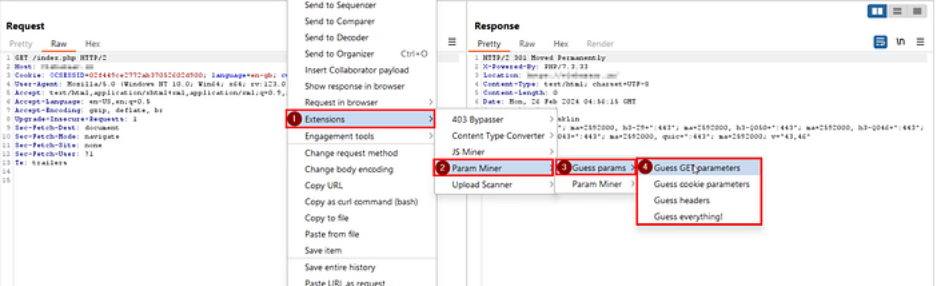
Figure 2 - Launching a GET parameter guess through the Param Miner context menu.
3. Confirm the scan configuration
Param Miner opens an "Attack Config" dialog with its scan settings pre-populated with sensible defaults. Unless the engagement calls for a custom wordlist or tighter tuning, the defaults are reasonable; click OK to start the scan.
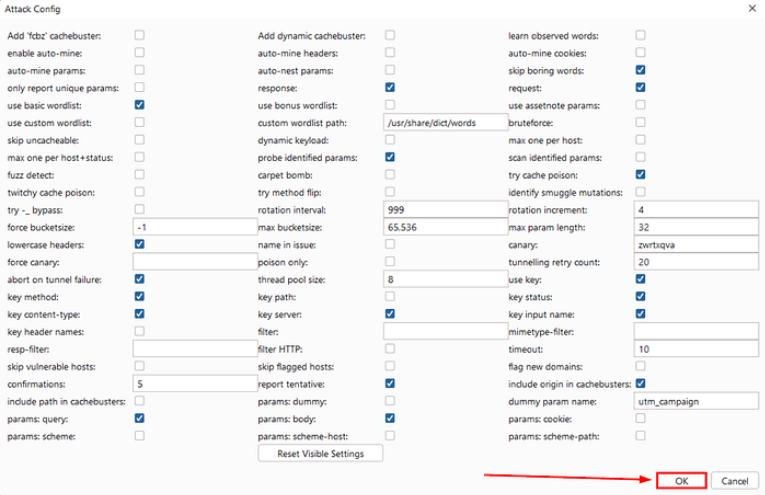
Figure 3 - Param Miner's attack configuration dialog before starting the scan.
4. Review the results
Scan progress and findings appear under extensions → installed → Param Miner → output. Once the scan completes, Param Miner lists every parameter name that produced a measurable change in the application's response. In this case, four parameters:
search
route
tracking
popup
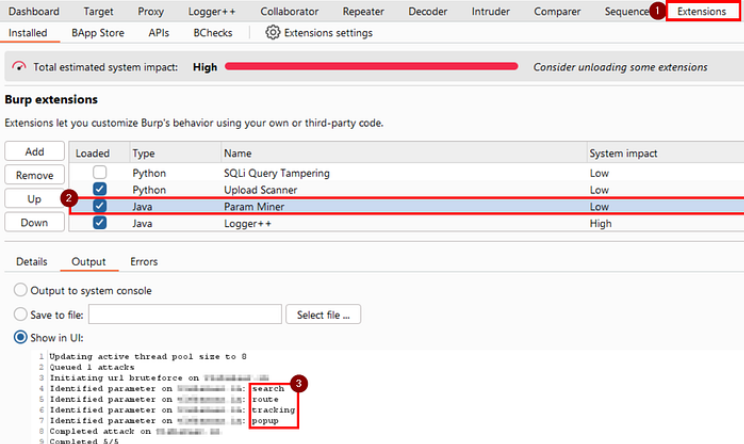
Figure 4 - Param Miner's output tab listing the four identified parameters.
5. Validate the findings manually
An automated hit is a lead, not a confirmed vulnerability; the next step is to reproduce it manually in Repeater. Sending each parameter with a distinctive marker value ("testbug", in this case) makes it easy to confirm exactly how the application is using it.
Adding the search parameter with the marker value suppressed the redirect entirely (no more 3xx response). It caused "testbug" to be reflected in both the response body and response headers, a strong signal that the value is being echoed without sanitization.
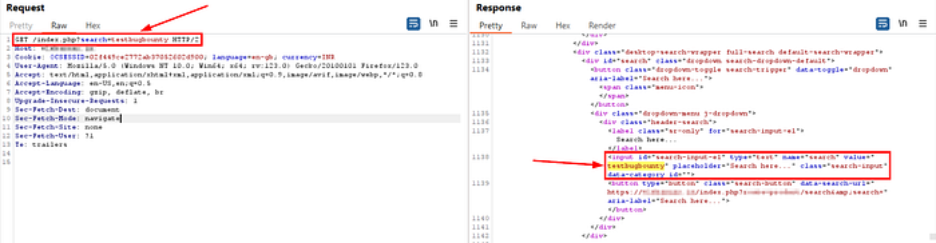
Figure 5 - The search parameter reflected in the response body and headers.
The remaining three parameters behaved similarly, each reflecting the marker value in the response:

Figure 6 - The route parameter reflected in the response.

Figure 7 - The tracking parameter reflected in the response.

Figure 8 - The popup parameter reflected in the response.
Assessing the impact
Unsanitized reflection of user-controlled input is a strong starting point for further testing. With all four parameters confirmed, the next step in a real assessment would be to probe each one with targeted payloads for the vulnerability classes its behavior suggests:
Cross-site scripting (XSS): Test whether HTML/JS special characters in the reflected value survive into the response unescaped.
SQL injection (SQLi): Test whether the parameter reaches a database query, using time-based or error-based payloads.
Server-side request forgery (SSRF): Particularly relevant for route-like parameters that may control internal redirects or fetches.
Each of these should be tested carefully and only within the scope and rules of engagement agreed with the client, since payload testing can have side effects on a live application.
Recommendations for developers
From a defensive standpoint, this class of finding usually points to the same handful of root causes, and the fixes are correspondingly straightforward:
Encode or strip user input before reflecting it into HTML, JavaScript, or HTTP headers; never trust that a parameter is safe just because it isn't documented.
Apply an allow-list of expected parameters at the application or WAF layer, and reject or ignore anything outside it.
Remove debug, tracking, or legacy parameters from production code paths once they're no longer needed.
Apply the same input validation and output encoding standards to every parameter the server accepts, not just the ones referenced in the client-side code.
Conclusion
Hidden parameters are easy to overlook because there's no visible trail leading to them, including no link, no form field, no entry in the API documentation. Tools like Param Miner close that gap by systematically testing for parameters the application quietly accepts, turning a blind spot into a concrete, testable finding. As shown here, a few minutes of automated scanning followed by manual confirmation in Repeater was enough to surface four undocumented parameters, each a candidate for further exploitation. Building this technique into a standard pen-test workflow, alongside the usual GET, cookie, and header scans, helps ensure this category of hidden attack surface doesn't go untested.
How Zensar helps secure APIs
1. Endpoint/parameter enumeration as part of the pen test methodology
Zensar's penetration testing combines automated discovery with manual techniques rather than relying on a scanner or an OWASP Top 10 checklist alone, which is exactly the two-stage approach the doc describes (Param Miner's automated brute-force → manual confirmation in Repeater). Zensar's team would run this kind of parameter-guessing sweep (GET params, cookies, headers) as a standard recon step before deeper testing, not as a one-off technique.
2. API-specific assessment
Zensar has performed API security assessments alongside threat modeling and dynamic testing for clients where undocumented interfaces were part of the exposed attack surface, the same category of risk as the search/route/tracking/popup parameters your doc uncovers.
3. Validating impact, not just flagging it
Zensar's approach is to validate and safely exploit findings to show what's exploitable and how it affects the business, rather than stopping at "this parameter is reflected."